

CHAPTER ONE: Digging into the Details About Federal Candidates’ Supporters — Looking Beyond the Hype, Hyperbole, and Total B.S.
By F.E.C. Nerd
The U.S. Supreme Court’s Republican appointees negated virtually all of the campaign finance reform laws at the federal level over the past several decades. (Buckley v. Valeo; Citizens United; National Republican Senatorial Committee v. Federal Election Commission.) They have left us with little protections against the excesses of extreme campaign spending by powerful monied interests in an attempt to literally “buy elections.”
There are some campaign contribution limits, but thanks to the court cases, there are many ways to circumvent those limits. What is left is campaign finance disclosure. We voters must use that one remaining tool to inform ourselves. So, I write this to help the reader with practical guidance to assist in determining the sources and likely motivations of the big-money players in our current election cycle.
I’ve been overwhelmed by the deluge of TV ads by Eric Jones, the challenger in our home district (California Congressional District 4). Sometimes the same tedious AI-generated ad appears on my TV screen as many as four times in a single program!! Not to mention, the wholly unsolicited SPAM texts from someone I haven’t given my number, or permission to fill my inbox. Plus, the paid canvassers delivering doorhangers despite my “No Soliciting” sign. So, I ask myself, WHERE IS ALL THAT MONEY COMING FROM? Perhaps you are wondering the same thing.
Here’s how to find the answers from the authoritative source — not some “never-heard-of-it- before” on-line website or slick campaign ad. Because my goal is to help you to ferret out the truth and then allow you to reach your own conclusions based upon the unvarnished facts, you do not need to “trust me” in terms of viewpoint. Just do your own research and decide for yourself. Ballots have just been mailed, early voting begins in the next few days and the candidates have debated on TV. (See here for the video of the debate, in case you missed it):
https://kcra.com/article/congressional-district-4-debate-recap-mike-thompson-eric-jones/74070817
So, this is an opportune time to delve into the facts behind the facade and find out what’s really powering these incessant attack ads.
LESSON ONE: Sorting Analyses Using Basic Standard Filters
HOW TO BEGIN
Step One: Log into your favorite Internet browser. Then go to:
https://www.fec.gov/data/browse-data/?tab=candidates
This will take you directly to the Homepage of the Federal Election Commission (FEC) and its webpage that permits browsing of candidates’ financing. This is the official repository of federal election campaign finance information relating to Federal office candidates. Campaign reports are filed electronically and the information reported can be directly accessed here.
Step Two: Scroll down the page towards the bottom and click on the link for “House of Representatives Candidates.”
Step Three: The next page that appears lists all House candidates in order of totals raised for this election cycle. The list is topped by AOC, with Hakeem Jeffries and Mike Johnson both near the top. However, if you scroll down to the 18th-ranked you will see Eric Jones with $8.3 Million. Where did all this money come from?
Step Four: So that you know how to search for any House candidate use the search box — “Candidate Name or ID” in the upper left corner. Type in: “Jones, Eric”. A drop-down list of several “Jones” candidates will appear. Select the one for “Jones, Eric H6CA04222”. That will take you to the link for Eric Jones’ campaign reporting.
Step Five: Scroll right to get into the main display and click on the “Jones, Eric” link that is active. This will take you to the following screen, where we start to get to the substantive data.
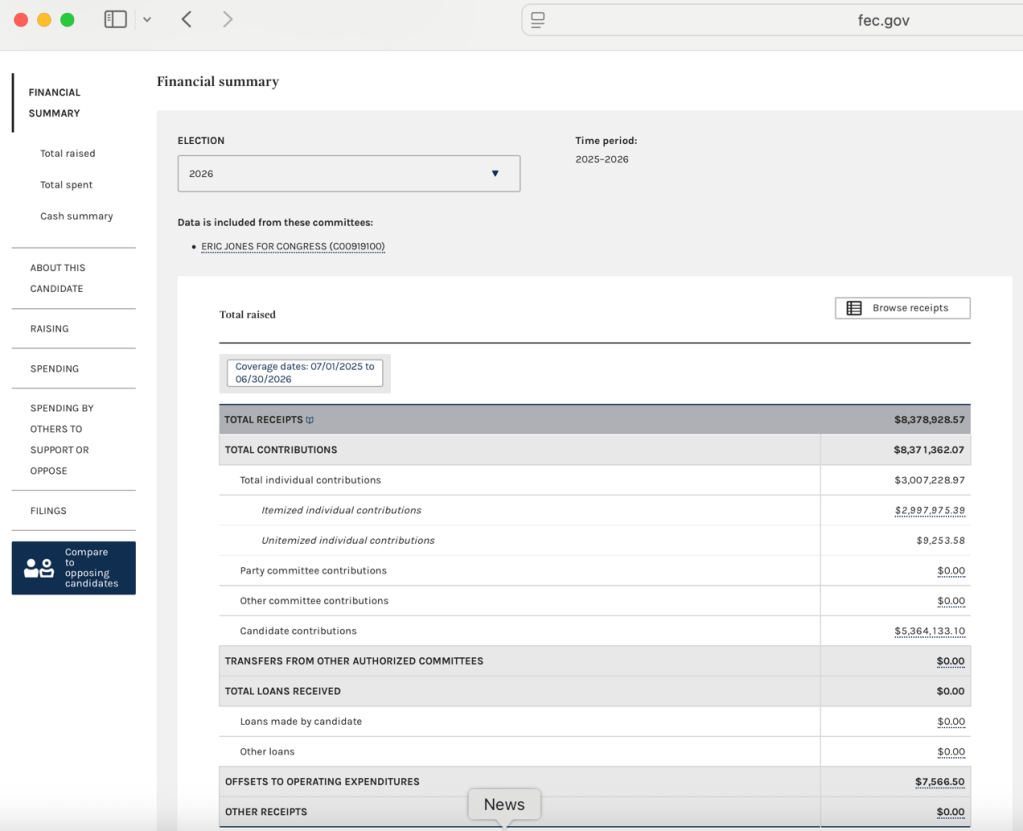
At the top is “Total Contributions” and below it “Total Individual Contributions” and then below that, how much of the total were “Itemized” and how much were “Un-itemized”. Un-itemized contributions must be less than $200 aggregate from the same source during the reporting period. So, this presents an initial tool for comparative analysis. But first let’s dig a bit deeper.
Step Six: Scroll to the left and click on the dark-blue box “Compare to opposing candidates.”
This will bring up another page of data (as shown below) for the main three candidates in the June Primary. Mike Thompson finished first, but Eric Jones narrowly bested Raymond Riehle, for second place and onto November’s General Election run-off. We will return to this screen again as we do our research.
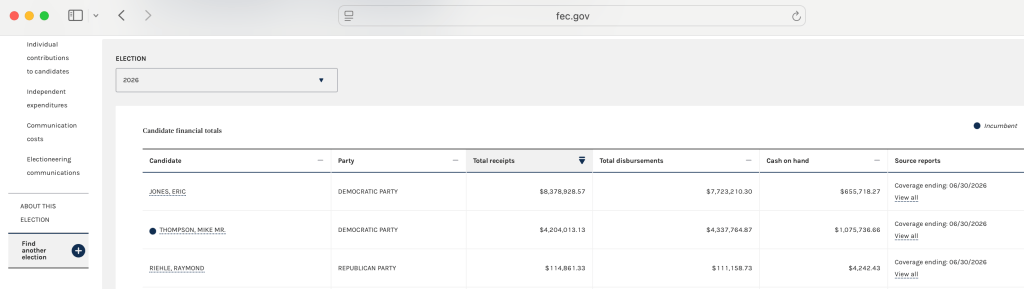
Step Seven: Click on the “Jones, Eric” link to return to his campaign reporting to see where the $8,378,928.57 came from. You will see that his own contributions (through June 30, 2026) totaled $5,364,133.10. Next, click on the link for “Itemized Individual Contributions” to find out who ponied up the $2,997,975.39. This will take you to the following page, which is where this exercise starts to get interesting. IF you don’t see this display, you may need to scroll to the right near the top and click on “Filter This Data” to reach this point. We will return to this screen occasionally to search using varied filter criteria.
Step Eight: You will bring up a page that looks like this:
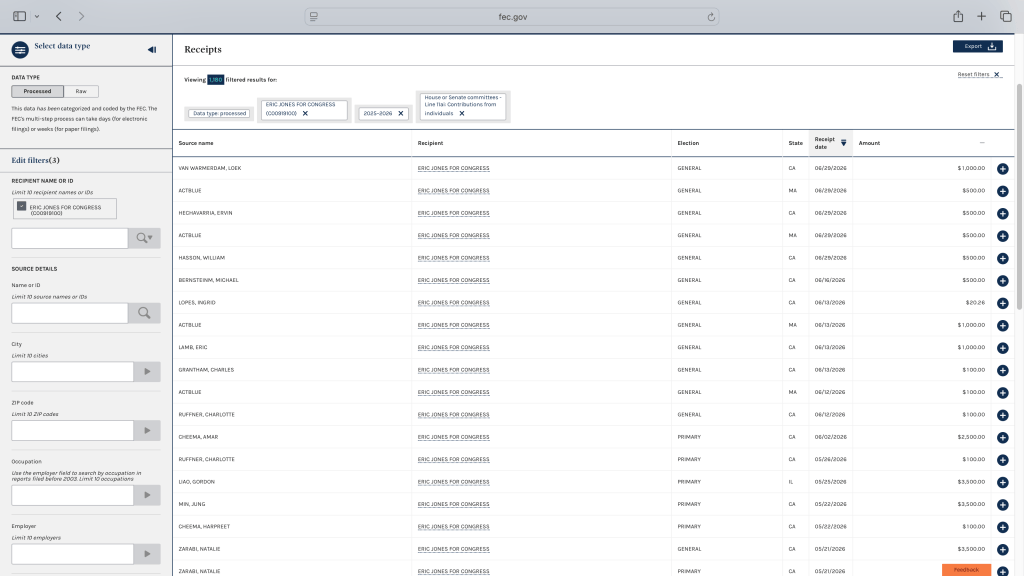
At the very bottom (it doesn’t show in this screenshot) is the information that this is page one of
many: “Showing 1 to 30 of 1,180 entries” so there is much more to explore!
Legal Matters: Before digging into the details, a couple basic legal rules are important to understand about Federal elections.
First, corporations are prohibited from making contributions directly to Federal candidates. No Federal candidate may be accepting “corporate contributions — PERIOD!! I want emphasize this because Eric Jones’ campaign has made a big point about “No Corporate Contributions.”
The FEC’s Campaign Guide for Congressional Candidates and Committees states:
1. Prohibited Sources
Corporations, labor organizations, national banks
Campaigns may not accept contributions made from the general treasury funds of corporations, labor organizations or national banks.1 114.2(a), (b) and (d). This prohibition applies to any incorporated organization, including a nonstock corporation, a trade association, an incorporated membership organization and an incorporated cooperative.2 Example: The owner of an incorporated “mom and pop” grocery store is not permitted to use a business account to make contributions. Instead, the owner would have to use a personal account. A campaign may, however, accept contributions from separate segregated funds (PACs) established by corporations, labor organizations, incorporated membership organizations, trade associations and national banks. 114.2 and 114.5.
Second, one of the few remaining limits in Federal campaign finance law is on the amount a single contributor may contribute to a given candidate “per election.” The Federal law treats the Primary as one “election” and the General as a different “election,” even though they occur in the same two-year election cycle. The inflation-adjusted limit currently is $3,500.00 PER ELECTION! That means up to $7,000.00 Total per contributor!! But, wait, there’s more! A contributor does not need to wait until after the Primary election to give the full $7,000.00 to a candidate. They may “designate” up to $3,500.00 as being for the Primary and up to another $3,500.00 as being for the General and give all that $7,000.00 well in advance of the Primary election. However, the candidate is not supposed to use the money designated for the General for expenses related to the Primary election. Now, let’s turn to where the money is coming from by using some of the filters on the FEC’s webpage.
Step Nine: On the basic Eric Jones page (Step Seven), click “Raising” and then below that, click “Individual contribution transactions.” This will bring upthe FEC’s built-in macro-filters, then click on “Size.”
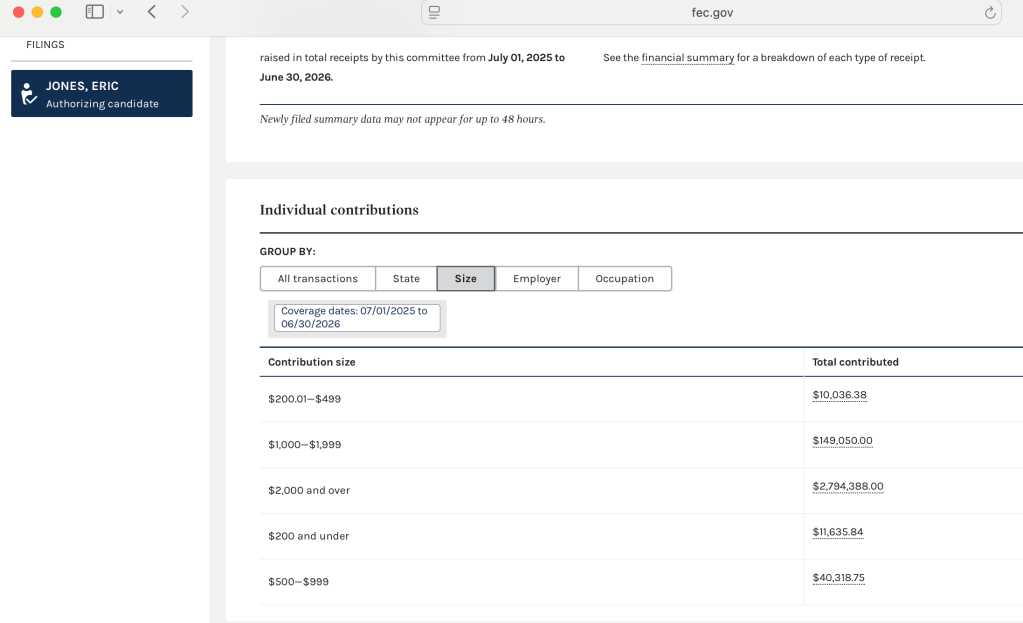
Now, instead, click on “Occupation” and you will see this:
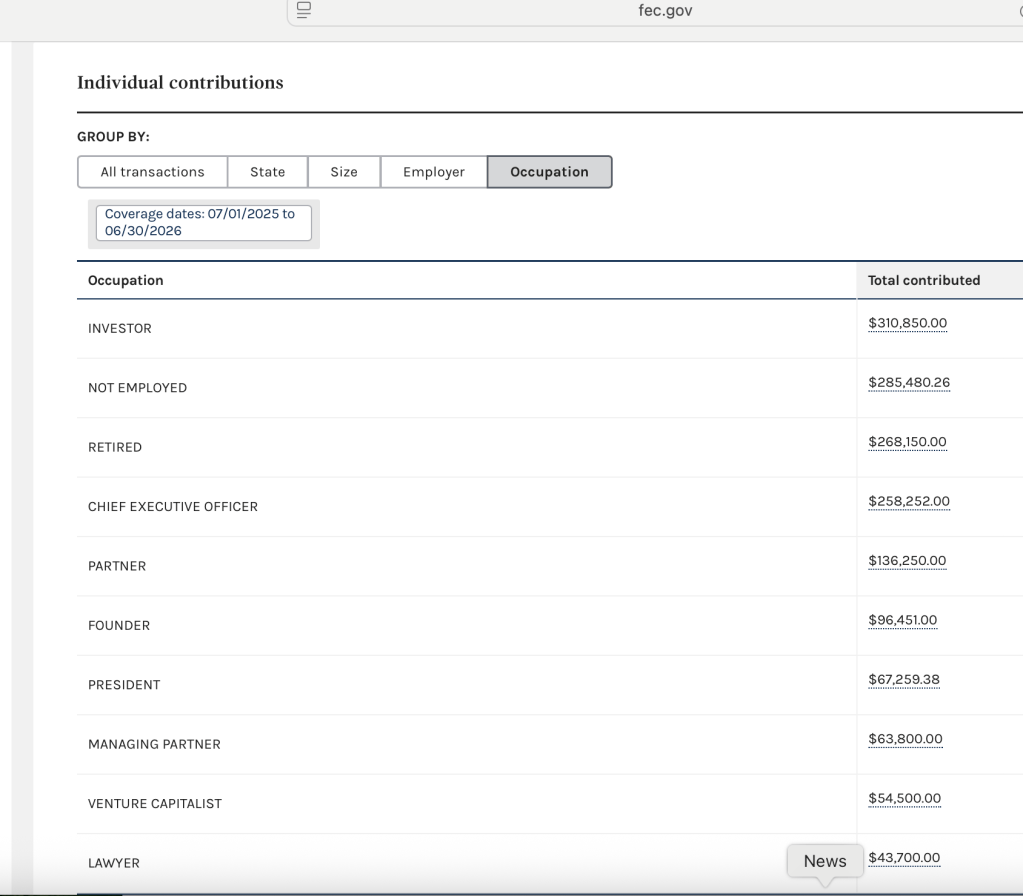
Next, let’s click on “Employer” and we see:
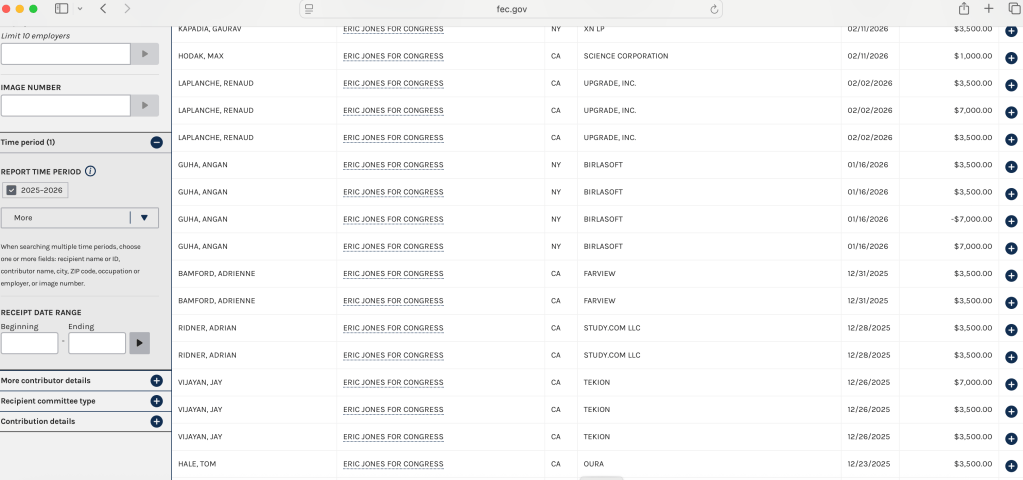
Let’s take a look “Vijayan, Jay” who is shown as contributing $14,000.00 (twice the allowable limit) on 12/26/2025. We can see that his employer is “TEKION”. Click on the + button to the right to see that his relationship with Tekion is “CEO.” So, what is TEKION? An on-line search brings up the following:

The last “macro-filter” on the FEC webpage is “State.” You may click on that button and scroll around the map to the right to see how much comes from contributors in various states. The “California” total is by far the largest, but because it only sorts by state, not by Congressional District, it is not terribly useful. There are other means to filter out relevant data. Those will be covered in Lesson Two of this Chapter One, to be posted shortly.
But first, try doing a similar basic macro search of Mike Thompson’s campaign reports. That will provide you with some initial comparisons. Go back to the page where it showed all the California Congressional District 4 candidates (See Step Six.) Previously, you clicked on the link for “Jones, Eric.” This time click instead on the link for “Thompson, Mike Mr.” When that page opens up; as before, click on the “Raising” link in the left-hand column, then on the “Individual contribution transactions” link. Then click on “Size” to see his spread.
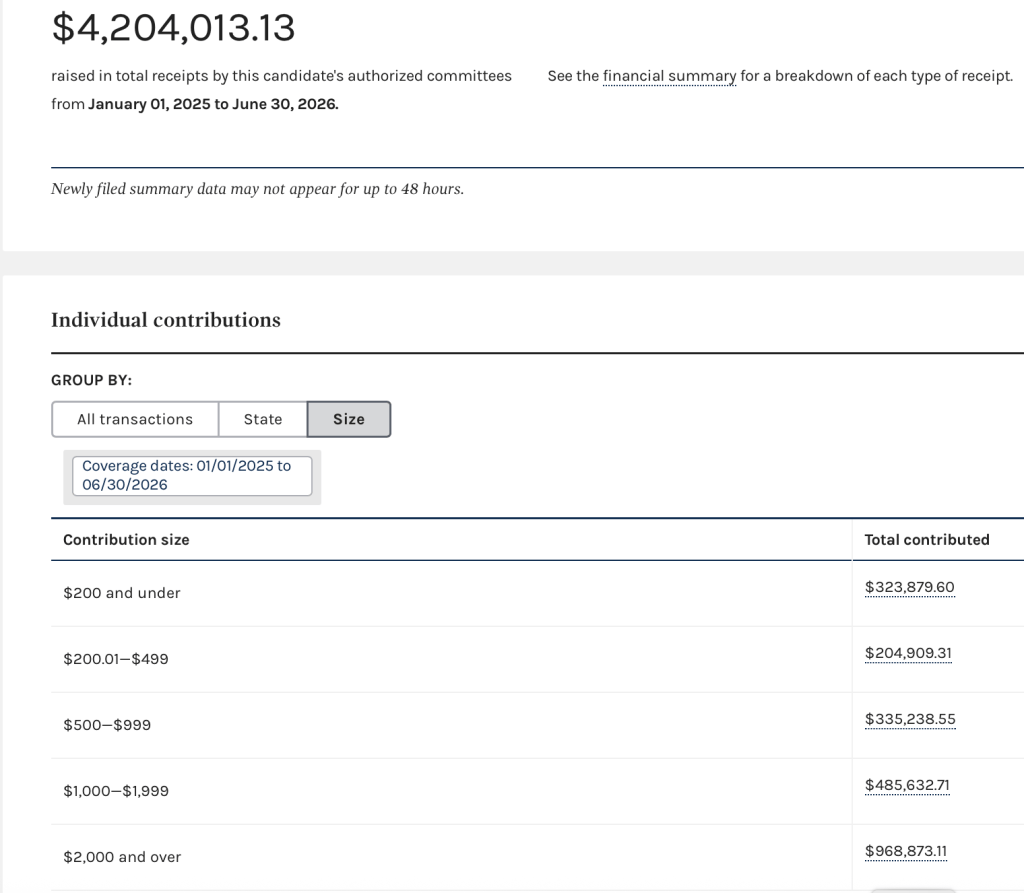
You can use this to compare with the same macro-filter sorting of Eric Jones’ contribution data.
This concludes Lesson One of Chapter One. Congratulations if you stuck with it thus far. Lesson Two will follow soon. [LINKED HERE]. In it, we can delve into searching and sorting data utilizing our own chosen parameters and search terms.
NOTE: The other important informational aspect of campaign finance disclosure appears in the tag-lines to ads on TV, or on the radio, or on the mailers themselves. In order to determine where to begin researching the money behind these communications, you need to gather that information. They legally have to disclose it, but they try to minimize it as much as possible. So, if you are seeing an annoying ad on TV, grab your phone and take a quick photo when that information appears, so that you can look at it carefully. If you get a campaign mailer, before you throw it into your favorite “circular file” write down or grab a photo of the “sender ID” on the mailer. This will be pertinent for our research in Chapter Two and also in Chapter Three, where I plan to elucidate how to use the State of California’s disclosure resources to learn who is funding the numerous ballot measure campaigns this year.



Leave a Reply